Friday, 30 May 2014

TestNG POM

Problem :

nable to locate the Javac Compiler in:
  C:\Program Files (x86)\Java\jre6\..\lib\tools.jar
Please ensure you are using JDK 1.4 or above and
not a JRE (the com.sun.tools.javac.Main class is required).
In most cases you can change the location of your Java
installation by setting the JAVA_HOME environment variable.


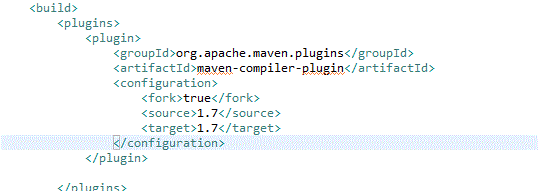
How to solve :  Add this line   fork -> true


Wednesday, 28 May 2014

Testlink Installation Problems


1. problem 
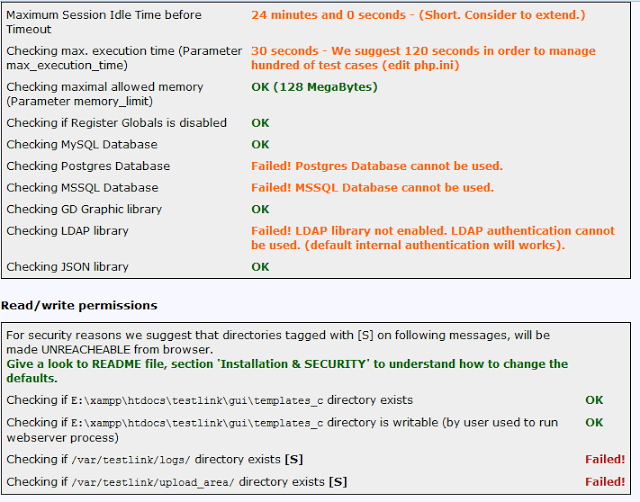
To solve Maximum Session Idle Time before Timeout  and Checking max. execution time (Parameter max_execution_time) errors in TestLink we need to edit php.ini file.

max_execution_time=3000
session.gc_maxlifetime=60000

2. problem

$tlCfg->log_path = 'E:\xampp\htdocs\testlink\logs'; /* unix example */
$g_repositoryPath = 'E:\xampp\htdocs\testlink\upload_area';  /* unix example */

Testlink Workflow


  • Login in Test link.
  • Create the Project and enable the requirement functionality option.
  • Create the Test case.
  • Create the Requirement.
  • Map the Requirement with Test case using Assign Requirement.
  • Create key word using Keyword Management and assign key word at module level or Test case level (Optional).
  • Create the Test Plan.
  • Add the Test case to Test Plan.
  • Assign the Test case from Test Plan.
  • Create the Build for the Test plan using Build Management.
  • Login as Executer and start executing the Test cases.
  • Go to Report and view all the available Report 


Tuesday, 20 May 2014

Selenium Grid - Hub & Node Configuration

First you need to download selenium-server-standalone-2.41.0 jar file


Use this command from command prompt java -jar selenium-server-standalone-2.41.0.jar

Hub started as you can see from above picture

Open browser http://localhost:4444/   you should see below screen


Now I want to configure node in the same machine


Open another command prompt and you need to specify some  parameters  (as node)


Wednesday, 14 May 2014

Why We use Page Objects for Selenium

Why use page objects?
  • Maintenance
  • Readability of scripts
  • Reduced or eliminated duplication
  • Reusability

Some Advantages : 

- Separation between test code and locators
- Class acts as an interface to actual page of application
- You can use methods of page object whenever you want to interact with GUI

 Location:
org.openqa.selenium’   ----->    org.openqa.selenium.support.PageFactory  


@FindyBy :  You can either use this annotation by specifying both "how" and "using" or by specifying one of the location strategies (eg: "id") with an appropriate value to use.

@CacheLookup : annotation is being used to eliminate the searching of the web element every time an action is performed


Monday, 12 May 2014

Selenium Web Driver Command List


  • driver.get("http://www.google.com"); To open an application
  • driver.findElement(By.id("passwd-id")); Finding Element using Id
  • driver.findElement(By.name("passwd")); Finding Element using Name
  • driver.findElement(By.xpath("//input[@id=’passwd-id’]")); Finding Element using Xpath
  • element.sendKeys("some text"); To type some data
  • element.clear(); clear thecontents of a text field or textarea
  • driver.findElement(By.xpath("//select")); Selecting the value
  • select.findElements(By.tagName("option")); Selecting the value
  • select.deselectAll(); This will deselect all OPTIONs from the first SELECT on the page
  • select.selectByVisibleText("Edam"); select the OPTION withthe displayed text of “Edam”
  • findElement(By.id("submit")).click(); To click on Any button/Link
  • driver.switchTo().window("windowName"); Moving from one window to another window
  • driver.switchTo().frame("frameName"); swing from frame to frame (or into iframes)
  • driver.switchTo().frame("frameName.0.child"); to access subframes by separating the path with a dot, and you can specify the frame by itsindex too.
  • driver.switchTo().alert(); Handling Alerts
  • driver.navigate().to("http://www.example.com"); To Navigate Paeticular URL
  • driver.navigate().forward(); To Navigate Forward
  • driver.navigate().back(); To Navigate Backword
  • driver.close() Closes the current window
  • driver.quit() Quits the driver and closes every associated window.
  • driver.switch_to_alert() Switches focus to an alert on the page.
  • driver.refresh() Refreshes the current page.
  • driver.implicitly_wait(30) Amount of time to wait
  • driver.set_script_timeout(30) The amount of time to wait
  • driver.get_screenshot_as_file('/Screenshots/foo.png') The full path you wish to save your screenshot to
  • driver.get_screenshot_as_base64() Gets the screenshot of the current window as a base64 encoded string which is useful in embedded images in HTML
  • visibilityOf(WebElement element) – An expectation for checking that an element, known to be present on the DOM of a page, is visible.
  • titleIs(java.lang.String title) – An expectation for checking the title of a page.
 
  • titleContains(java.lang.String title) - An expectation for checking that the title contains a case-sensitive substring
 
  • textToBePresentInElementValue(By locator, java.lang.String text) – An expectation for checking if the given text is present in the specified elements value attribute.
 
  • textToBePresentInElement(By locator, java.lang.String text) – An expectation for checking if the given text is present in the specified element.
  • stalenessOf(WebElement element) – Wait until an element is no longer attached to the DOM.
 
  • refreshed(ExpectedCondition condition) – Wrapper for a condition, which allows for elements to update by redrawing.
 
  • presenceOfElementLocated(By locator) – An expectation for checking that an element is present on the DOM of a page.
 
  • presenceOfAllElementsLocatedBy(By locator) – An expectation for checking that there is at least one element present on a web page.
 
  • not(ExpectedCondition condition) - An expectation with the logical opposite condition of the given condition.
 
  • invisibilityOfElementWithText(By locator, java.lang.String text) – An expectation for checking that an element with text is either invisible or not present on the DOM.
 
  • invisibilityOfElementLocated(By locator) – An expectation for checking that an element is either invisible or not present on the DOM.
 
  • frameToBeAvailableAndSwitchToIt(java.lang.String frameLocator) – An expectation for checking whether the given frame is available to switch to.
 
  • elementToBeSelected(WebElement element) – An expectation for checking if the given element is selected.
 
  • elementToBeSelected(By locator)
 
  • elementToBeClickable(By locator) – An expectation for checking an element is visible and enabled such that you can click it.
 
  • WebElement element = wait.until(ExpectedConditions.elementToBeClickable(By.id(“someid”)));

Friday, 9 May 2014

Selenium Csv File (openCSV)

First you need to import opencsv.jar file into the project


output will be like that below